
A 540 Hz OLED can fake a CRT now - and Windows is the part that's broken
Blur Busters' CRT beam simulator can make a 60 fps game on a 540 Hz OLED look as clear in motion as a '90s tube. The catch isn't the panel or the GPU: it's that Windows gives the shader no way to run on time.
Rene Sjeverac
Saturday, October 10, 2026
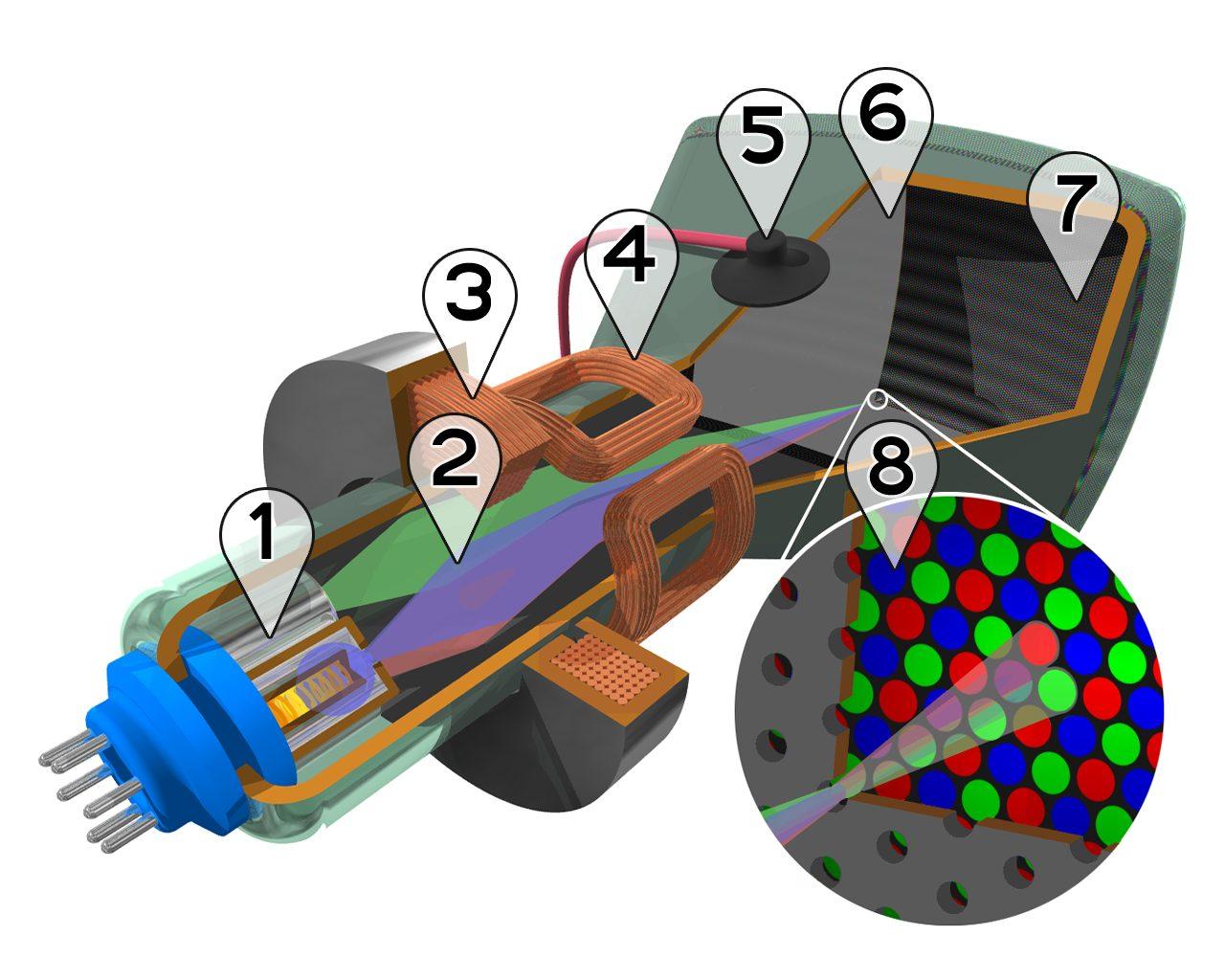
Less than a millisecond. That's how briefly a CRT lit each pixel before the phosphor faded, and it's the reason a 1998 Quake match on a 17-inch tube still looks sharper in motion than most of what we play on 2026 panels with ten times the resolution. Sample-and-hold displays smear, period. An OLED's pixel response is effectively instant, but the image still sits there for the whole frame, so your eyes track across it and it blurs anyway.
PC Gamer spent some quality time with a fix for that, and I've been down the same rabbit hole, so let me translate what it actually means for tinkerers.
The trick is Blur Busters' CRT beam simulator, the algorithm Mark Rejhon and ex-Nvidia dev Timothy Lottes put together in late 2024. The idea: take content locked at 60 fps and, on a 240 Hz or faster display, paint each frame as a rolling scan with simulated phosphor decay instead of flashing the whole picture at once. It's black frame insertion's smarter sibling. Classic BFI strobes at 60 Hz and a lot of people can't stand the flicker; the rolling scan with phosphor fade is far gentler on the eyes while delivering most of the same clarity. It started as a RetroArch shader, moved into an experimental branch of ShaderGlass, and now lives as a standalone app called ShaderBeam by developer Mausimus.
The test rig in the piece is Asus' ROG PG27AQWP-W, a 540 Hz OLED with a 720 Hz mode at 720p. With that much headroom the result is the headline number: a 60 fps game ends up with motion clarity in the neighbourhood of a native 540 fps one, and you don't need an RTX 5090 to get there. For a retro shooter, an emulator, or anything capped at 60, that's the biggest motion-quality jump available right now short of buying an actual tube off a classifieds site.
Why it falls apart, and why it's not the GPU's fault
Here's the part that made me nod and swear at the same time. ShaderBeam can't hook into a game's rendering pipeline. It works by capturing the screen and drawing over it through a transparent window, which are two Windows features that were never designed for frame-accurate timing and make zero guarantees about it. Whether your simulated beam lands on time is down to whatever the OS scheduler and the GPU driver feel like doing in that millisecond. When the app doesn't get its GPU slice in time, you get flashing.
Mausimus' own diagnosis is that a single GPU has plenty of power for this; the problem is that the power isn't distributed predictably. I've chased enough frametime spikes to know exactly what that feels like. Averages fine, 1% lows ruined, and nothing in the settings menu to blame.
The workaround list reads like a tuning forum thread from 2009: turn off VRR, disable driver features, unplug your second monitor, pin priorities with Process Lasso, poke a registry key, and - my favourite - offload the shader to the integrated GPU so it gets its own hardware. It works. It's also absurd that in 2026 the clean way to get CRT motion on a 540 Hz OLED is a dual-GPU hack.
Nvidia's answer is G-Sync Pulsar, which does strobing plus a rolling refresh in hardware and claims a perceived 1,000 Hz of clarity. Good, but it's Nvidia-only and there's still no OLED version, so for OLED owners it doesn't exist yet.
Rejhon's bet is that the real fix arrives when the OS exposes proper shader hooks, or when monitors ship with their own little processing GPU to do the beam simulation on the display side, which he puts in the 2030s. I'd take either. Windows already has a display pipeline, a compositor and a low-latency mode; what it doesn't have is a way for software to say "present this at exactly this sub-frame slot." Until it does, the fastest panels ever made will keep waiting on the operating system to get out of the way.
Image: grmwnr (homewiki) / CC BY-SA 3.0, source: https://commons.wikimedia.org/wiki/File:CRT_color_enhanced.png